
This page provides important information about our content and technical requirements for issuing any press release with the Send2Press® Newswire service. All clients must review this information prior to submitting any project.
QUICK JUMP TO SUPPORT INFO ON THIS PAGE:
Release Content and Format Requirements »
Example Release File Download »
If you get confused, please email us at: help@send2press.com
This page last updated May 1, 2026 and supercedes all prior versions.
Frequently Asked Questions:
Our FAQs have moved to a dedicated page.
View our 2026 FAQs »
Getting started is very simple: we have no account sign-up, no membership fees and all service pricing is per project.
- Review our service package pricing and features page.
- Review this page (you are on now) with our content and format requirements.
- Review our Acceptable Content Policy (ACP) to check the types of news we do and do not accept/allow.
- Use our secure Order Center to order desired service then upload project.
View Acceptable Content Policy
Business Hours:
Based in California, USA, our normal business hours are 9 a.m. PST/PDT to 5 p.m. PST/PDT (12 p.m. to 8 p.m. EST/EDT), Monday through Friday. We are closed weekends and U.S. holidays. See our pricing and features page for deadlines and cut-off times.
CONTENT REQUIREMENTS INTRODUCTION
Note the first section below is an overview, while the second section has the mandatory requirements with examples for our news formatting.
OVERVIEW - GETTING STARTED:
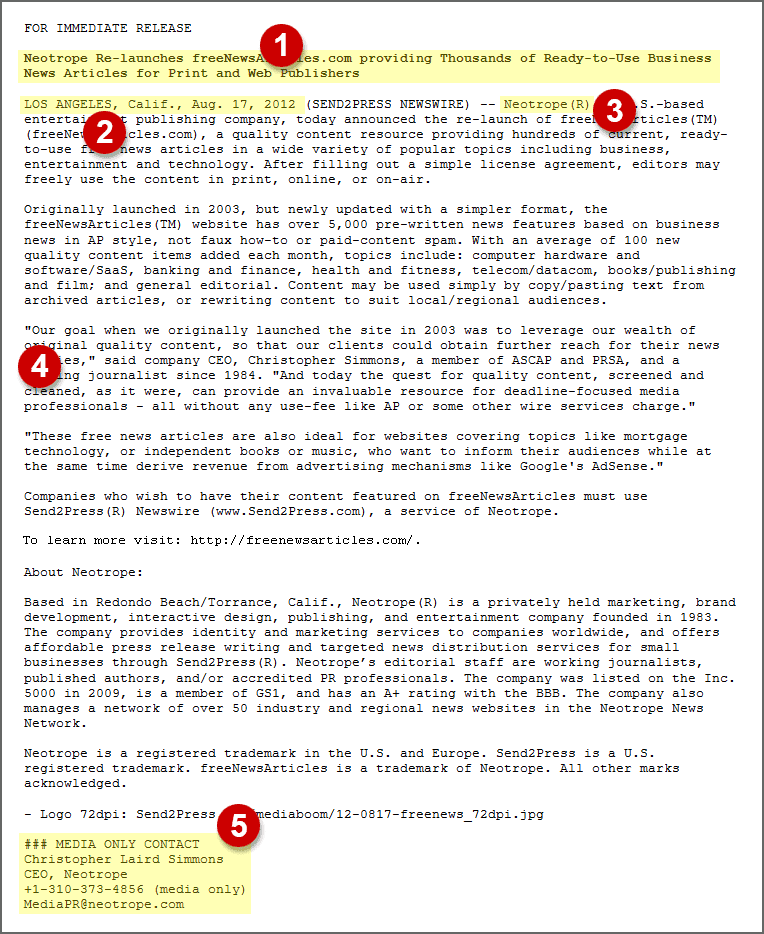 You may find it useful to first click or tap the thumbnail image at right to see a visual example of what a proper press release looks like (opens in new browser "tab"), with sections identified by numbers 1 through 5. We'll be using those numbers in a moment to explain each section as simply as possible. Generally, we follow AP Style. Example files are also found below, which you may download to review and/or use as a starting point for your own project with Send2Press®.
File Formats:
We accept MS Word (.doc/.docx), Rich Text (.rtf), and text (.txt) files for submitted press releases only. We cannot use PDFs, or any design program file. If using Apple Pages or similar, please “save as” (or export) to MS Word format. Google Docs can export to MS Word format, also.
Press Releases are Not Articles:
We can only issue, transmit and disseminate proper press releases, not articles with byline, or feature push. All releases must have proper headline. First paragraph of all releases must start with dateline city and state. There must be proper attribution from the "news source" in the text of first paragraph to make clear "who" is issuing the release (this is covered with examples, below).
Stale and/or Duplicate Content:
Please note that we strongly discourage issuing a release with stale headline already issued via another wire service. Because various systems pull news from all major wire services like ours, using same content across multiple services can result in content spam complaint, duplicate content penalties, and other problems. No newspaper site syndicating news wants multiple copies of the same headline on their site, and may actually delete all copies vs. sorting out the primary version. So, it's mandatory to change headline, and perhaps first paragraph for news submitted to Send2Press, if the news has already been issued or scheduled with another news service.
Word Length Limit Reminder:
Please remember that our premium S2P+CISION distribution plans have a specific word length limit which includes all of the required elements noted below. You calculate the “word length” by using the word count feature in your word processor (they all have this function). For our normal plans we generally limit length to 1,200 words. This is noted in the full features info for each plan on our price list and package info page.
Deadlines and Cut-off Times:
For complete information on our daily deadlines and cut-off times for submitting content, please visit our pricing and features page, linked to above and in the navigation menu. Generally, we need a fully proofed ready to go release by 2 p.m. PST/PDT to push next morning prior to when we open. For same day push, we need content by 9 a.m. PST/PDT. Projects for early Monday must be submitted Friday prior to our closing.
Celebrity Names:
Please note we don't allow use of celebrity names that are not material to the news bening announced. Certain mentions of a celebrity may require adding the following at end of the release for legal protection: No celebrity endorsement claimed or implied.
CONTENT REQUIREMENTS - STEP BY STEP
All projects submitted must meet these mimimum content and format requirements to be accepted and transmitted.
1 The Headline
All press releases start with a headline (or “title”). This is the main element used to link to your news online, used as the subject line in emails to media folk, and describes what it is you're announcing as news. It should contain your most important focus keywords. Headlines are now done as Initial Capped and not ALL CAPS.
Also note, only ONE secondary headline (or “subhead,” sometimes called a “deck”) is supported, which also should not be longer than 20 words for best results online. If you are submitting the same release to multiple newswires, or mixing junk free posting sites with legitimate wire services, you should change the headline and first paragraph on the junk site to avoid duplicate content problems with Google (content coming from a newswire like Send2Press is identified to Google as the “syndication source”). Text in headlines cannot contain hyperlinks.
For our style, quote marks in headlines are done as single quotes.
Example below:
The New Memoir, 'Bunny Loves Rabbit' hops onto best seller list
Important SEO Note:
Be aware using trademark symbols, percentage sign, dollar sign, ampersand, tildes, and similar HTML elements may adversely affect your ability to search/find content based on "quoted searches" for your headline in Google.
2 The First Paragraph
All press releases have (following a headline and optional sub-head, as noted above) a first paragraph which is sometimes called the summary. This is primarily what is seen in social media (e.g., X/Twitter, Facebook, LinkedIn, etc.), Google News, and most search engines related to your press release. This section always starts with the “dateline” which is the city and state where the news is originating (such as where the business/company is, or an event location). For international cities, city and province should be used or applicable locales.
The city is done ALL CAPS, and the state is abbreviated to AP Style and not post office abbreviations (we'll fix this if needed), and then the date the release is being issued (not a date in the past or future). The dateline is followed by our wire service identifier which is (SEND2PRESS NEWSWIRE) and then two hyphens, then the text of the summary about your news.
See examples in next section (3).
About AP Style and Datelines:
Please note that although AP Style indicates certain cities should stand alone in datelines (e.g., LOS ANGELES, CLEVELAND, etc.) we always include both city and state for better SEO and geolocation. Specifically, using Cleveland as an example, without the word Ohio in dateline, and if nowhere else in text, then the news would not be searchable via AP newsrooms, Google News Alerts, etc. via a quoted search for "Ohio."
3 News Source Attribution
This first paragraph section should also include your most important focus keywords (for SEO), and must have what is called “attribution,” which is the name of the news source announcing the news to make clear who is issuing this press release (Cogsworth Cog Co. in two examples below, or Neotrope in the graphic example; top of this page).
For example, in a press release being issued by Cogsworth Cog Co., the agency submitting the project is not the source, nor is the product being announced. The “news source” would be Cogsworth Cog Co. No release will be issued without proper attribution (we do not accept anonymous news or fake articles about a company written in positive light). The entire summary section should generally be one solid paragraph of your most important information and never more than 80 words or less than 20 words.
Two examples follow with attribution highlighted and with example datelines:
Example One:
LOS ANGELES, Calif., July 1, 2023 (SEND2PRESS NEWSWIRE) -- Cogsworth Cog Co. today announced their new line of whacky widgets to wash wonderful rabbits for relief from wrestling. The company is adding more hop to every pop for every cognoscenti attending their annual events.
Example Two:
CHICAGO, Ill., Sept. 15, 2024 (SEND2PRESS NEWSWIRE) -- A new line of cogs for logs shaped like dogs will be revealed at the 20th anniversary CogShow in Chicago, Cogsworth Cog Co. announced today. Cogsworth will be showing the new systems at booth #1234 in Coggy Hall, Oct. 20-24, 2024.
Event News:
Note that when announcing events, we do recommend including the full date of the event, including year, as some websites may only show this excerpt and not the remainder of the releasw text. It also helps annual event news not appear stale, if a release is done annually with similar content each time.
4 Body of Press Release
The body continues the first paragraph information (not repeating it), and this is the meat and potatoes of what you want somebody in the media to know about your news and why they should consider it of interest to their audience. The last paragraph in a release is often used for a “boilerplate” which is a section about the company, or about a person such as a book author along with link to a website for further information.
Note that color text, H2 and H3 tags are not supported in press releases for maximum legibility when syndicated. Interior sub-heads for paragraph sections work better as ALL CAPS, due to the AP not supporting BOLD text.
Send2Press supports both bold and italics within the body of the release, but not inside quotes or the main headline. Be aware AP does not support bold text. Both italics nad bold do not work in emails sent to media as plain text. Some websites and data platforms remove "styles" which are not relevant to the actual content.
Bullet Points:
Send2Press only supports normal bullet points — not arrows or custom icons. Most sites will render normal round bullets, however the AP website may use square bullets per their local site CSS. Bulleted lists and numbered lists will render based on the local HTML of the site publishing the content, entirely outside our control.
Quotes - Best Practices:
Between the first paragraph and the boilerplate, a quote from someone at the company, or from a book author, or musician doing self-promotion, is always recommended as modern “lazy media” will often take a quote from the release and never contact you. Real quotes are always preferable to quoting a positive third-party review, as media cannot use possibly paid positive review quotes about a company or book or service.
All quotes from a person at the company should be properly attributed to that person by real name and title, as applicable. Anonymous quotes should not be used or elements like "According to a company executive...." A press release is news coming from you (or your client), not being written about you. Similarly, use of aliases or abbreviations for a person's name is not proper attribution unless your client is Cher or Sting.
Media folk won't quote or work with people trying to hide who they are. International firms should not be shy about using real names as there is no bias in the media for a particular ethnic or non-English family name.
For AP Style, we put periods and commas inside quote marks; single quotes go inside any double quotes, and we don't put trademark symbols inside quotes, as people never "speak" a trademark symbol. We will correct as needed.
Multimedia:
Multimedia elements (links to image(s) or video), and social media links are often put at bottom after the main news text, and before the media contact info. Video links should be to YouTube, Vimeo, your own site or similar. We do not host videos.
Anchor Links:
Using unlimited anchor links (links to your website on words/phrases, or visible URLs) is allowed, however be aware that due to Google's guideline changes as of Aug. 1, 2013, these kinds of links will likely no longer help your SEO as they will be set as “rel=nofollow.” Visible (or “naked”) URLs/URIs are recommended. Anchor links on text and visible links are supported, including shortcode and/or tracking links.
See the using anchor links section, below this page, for additional information on this topic.
Using Charts and Tables:
It's best to avoid trying to include charts/tables in a press release as the column width varies on websites and tends to break the layout due to differences in local HTML style sheets, font sizes, etc. Copies in email which push as plain text may no longer line-up and defeat the purpose of the information. For charts — such as tables with columns and rows — using a web .jpg, or including a link to PDF, or a detailed web page, is preferable. (We cannot host PDFs on our site.)
5 Media Contact Info
All press releases issued and sent by email to media folk must have a contact person for the media. This is not optional when the package purchased includes sending news to media by email. A media contact is a person by full name, company or agency, phone and valid email address. Normally this is coded “for media only” but you may also instruct us to make the information visible to all online. You cannot issue a release anonymously or without a point of contact for media when it will be sent to media by email.
When Contact Info Not Needed:
With our ONLINE BASIC, ONLINE PRO, NATIONAL BASIC, REGIONAL BASIC, and S2P+CISION BASIC packages, a media contact is *not* required as these plans do not include email push to media folk. It is entirely optional to have a publicly visible media contact in any format for these packages.
Public and Media Only Contact Options:
In some cases you may want to have some contact info be for the public, and print online with all the release copies, and also have the normal “for media only” contact info which is required — and this can be totally different information. In these cases, the simplest way to let us know what should be public is to put three number signs (also called hash marks) at bottom of your text as ###. So, anything above the ### will be public, and anything below will be only for media, including any true note to editors, link to a press kit or other.
With distribution packages that include the AP (Associated Press), we do have an option to have media contact info visible online only on Send2Press.com/wire version and on APNews.com press release version. This will not be visible in AP newsrooms, or anywhere else online. For AP Newsrooms, if you represent a client as its agency, then some publicly visible media contact info is advisable.
EXAMPLE PRESS RELEASE FILES
These example file downloads show what a typical press release looks like as far as formatting, following the requirements specified above.
When you click/tap a link, below, you will need to save to your local hard disk or cloud app to open.
Example Press Releases Online:
You can review any of our client news from our Daily News Desk as well as search our news archives by keyword and/or topic.
View Send2Press Daily News Desk
PHOTO/IMAGE FORMAT REQUIREMENTS
These formats are general guidelines: note we will "resize" images to fit as applicable. All of our distribution packages include one image, with additional images offered as optional add-ons at added cost. Images should ideally not be ad banners unless something like event poster, or "black friday sale" type content (media will NOT use advertorial images)
QUICK TIP: use the blue button link in above section, or bottom of this section, to jump to our newsroom to see how images appear in actual live press release content.
Legal Disclaimer:
Image content should be either fully owned by you or your client (if an agency), sourced from an open source image bank that does not require licensing, or be generated with AI and be as original as possible (e.g., using a high "seed factor"). Using "found" content, or paid licensed image bank content, is not acceptable and may open you up to major copyright and/or licensing fees for infringement of intellectual property.
An image showing people, such as company staff/employees, not taken in a public place may require signed releases from shown individuals. Obtaining all proper clearances is entirely your responsibility. Photos of children should not be used for privacy concerns and regional/local laws.
Per our terms of service (TOS), you are responsible for any/all legal risks of content you provide to us, and we will be held harmless for any mis-use on your behalf. In the event of a complaint, there may be substantial costs involved in attempting to remove any offending content from our content partners and social media accounts.Online, Social & Syndication - 800x600px:
Our normal image size for 2026 is 800x600 pixels, horizontal (landscape). The safe area is 796x570 pixels. Visit our newsroom (link above section) to see how images appear online. Note that when adding multiple images (e.g., author photo, plus book jacket), many sites, including the AP, will only show the "primary image." With multiple images in addition to a "primary" image, it's often better to link to a gallery page on your website.
Print Image for Media - 4x3" 300dpi:
With many of our "PRO" distribtuion packages, we host a print-ready image for media in addition to a web image used for online, social and syndication. This will be a size of 4x3-inches, 300dpi. Images larger than this will be downsampled to fit the dimensions, either horizontal or vertical. Be aware this print image is also used for the online image, and so again, a horizontal image is preferred. You may also link to an image on your own website if desired.
Required Image Caption(s):
With all images, except company logos, we do need a short description (caption or "cutline"). For example with three people on a stage holding company award, you would have a short caption notating who is shown left-to-right (L-R) in the picture. A caption is not ad copy, and should be short and to the point, not paragraph about information that should be in the body of the actual release.
*Special note for S2P+CISION PRO package: with this package we will only have link to an image on the CISION/PR Newswire (PRN) copies of the release; meaning, their online copies will not have a visible inline image in text.
Image Placement:
The primary image is placed after first paragraph (mandatory) on the Send2Press.com/wire platform, with small caption text underneath. Supplemental image(s) can be placed lower in text between other paragraphs. Float left or float right is not supported. This ensures legibility on websites syndicating/cloning our main content format feed. Some websites will place image at top of story; some both top and inline. For the S2P+CISION BASIC package the free photo will be inline right side of full width story (example available on request).
Some websites like APnews and Street Insider, the Neotrope News Network, etc., will only show the primary main image and no supplemental image(s). When there are multiple images we will confirm which is to be the primary.
Image Changes/Replacements:
Please note that an image change will incur a $20 fee, and this will not replace images everywhere online due to local site caching. APnews.com generates a local copy of image we cannot update/replace. Many sites load images from our media server (e.g., Digital Journal, Street Insider, GoMedia, FinancialContent and Cloudquote networks) which can be updated for the stated fee. If an image needs to be replaced for legal matters the only option for some situations is complete removal of the story, such as on the APnews platform where, again, photos cannot be replaced or updated.
For same day legal matters, we may be able to push a DO NOT USE version of story to AP; then remove, then repost with new image and story ID. This may also push duplicate version of story to some sites. There is $100 fee for this option. Again, this option can only be done same-day of issuance, not week or month later.
Use the link below to see how images actually appear on our news platform.
View Send2Press Daily News DeskVIDEO / AUDIO EMBED OPTIONS
Send2Press can embed many common audio/video media formats, however we do not host any multimedia assets.
Supported Formats
We support local placement on Send2Press.com/wire with your story when content is publicly visible on YouTube, Vimeo, SoundCloud, Facebook Reels, and in some cases, video URL hosted on your own website. We cannot embed third party content such as a video from a TV station or similar. Only one video or audio embed supported, but you can link to as many media elements as you wish when placed bottom of your release. Link to video(s) in middle of release is perfectly fine, it just won't embed there.
Only YouTube videos (not shorts) can be syndicated onto other sites like the GoMedia network (100 sites typical). On our main site, you have option of featured mode (below headline), or anecdotal bottom of the release (normal practice). Videos cannot be embedded "inline" with a story. Only one video embed supported.
Link to the multimedia you wish to use should be found in text of your release, usually at bottom such as
VIDEO: https://youtubelinkhere...
ANCHOR LINKS - BEST PRACTICES
This section provides some important information about using anchor links ("hyperlinks") in modern press release content, and recommended usage with Send2Press.
NOTE: We do not allow affiliate links of any kind in press releases.
Limited Number of Links:
For many years we limited the number of links used in releases, but this is no longer an issue since Google made it a requirement for all legitimate newswire services to make links in press release content rel="nofollow" back in 2013; which means there is no longer a linking penalty for using more than 10 links in your release (within reason, of course).
Word Links vs. Visible Links:
It's important to ensure your most important hyperlinks in the release are visible, meaning something like https://www.send2press.com/help as opposed to only using anchor links on words or sentences (e.g., Send2Press Help + Requirements). The reason visible links are essential is that links on words or sentences do not work in emails to media and some websites strip them out. So a link like CLICK HERE FOR HELP is highly discouraged.
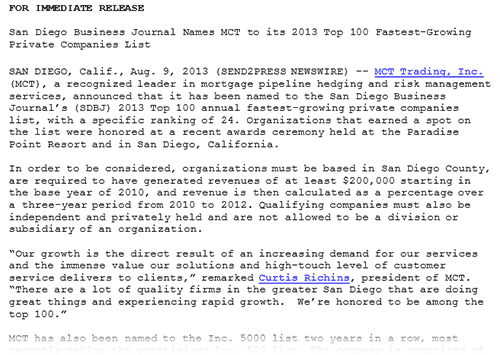
Use Semantic Links for Best Practice:
Because Google and other search engines, including AI tools, will follow all links in a release, if you do use links on words, they should be "semantic" links only. This means, linking to your home page with World's best chicken soup for a soup store, is not good practice. However, announcing a new chunky veggie soup and linking the soup name to the new product info page on the website is a good idea. Similarly, linking to the CEO's bio page on your site, where the name is the link is also good use of semantice linking. By "semantic" we mean the text and the link are strongly related to the page being linked to. However, again, remember links on words won't work in emails to media and some websites.
Use Fully Formed Visible Links:
When using visible URL links, we do highly recommend including the full https:// portion of the link. So, in first paragraph, you might have Send2Press linking to Send2Press.com, but at bottom in the boilerplate, you would use the full URL https://www.Send2Press.com/ to ensure the link actually works everyplace online. We also generally don't recommend putting mis-matched URLs on top of visible links, like putting a bit.ly link on top of the URL shown. We used to severely limit this behavior, but have completely relaxed this for 2026. "Do what you want" is our new rule on linking, as long as the link actually works at all.
How to Add Links:
We do not insert links for you. All your desired links should be properly inserted into your MS Word document. See the MS Word help information on how to add links. Typically, simply typing or pasting in a link to page on your website, then adding space after will auto-link for you. To add a link to word or short sentence (not entire paragraph!), simply right-mouse-click and choose "add link." Be sure to click all links to ensure they work.
AP STYLE USAGE & REQUIREMENTS
Send2Press follows most style conventions invented and used by the Associated Press (AP), with some minor exceptions.
While we still follow many usage guidelines, such as AP Style datelines, and putting commas and periods inside quote marks, some things like using percentage vs. % or 24-inches vs. 24" are no longer enforced, although still best practices. It's also common practice to use the so-called Oxford Comma for clarity in some content, and we will not correct these kinds of variations from AP Style anymore.
Quote Marks, Not Italics:
As part of AP Style, we put book and movie titles (but not magazine names) in quotes, not italics. So, we would use "Gone with the Wind" and not Gone with the Wind. Similarly quotes from someone in the release body, would be quoted, and not put into italics.
Example:
"The puppy loves his mom, and wow what a mom," said Jason Smith, CEO of Puppy Power Pals, Inc. "We are excited to have mom at the 'Super Puppy' book signings this summer."
This example also shows proper use of commas and period properly used inside of closing quote marks, not outside. Quotes inside of quotes are used as single quotes.
Fun with Dashes and Hypens:
Although traditional print publications would run long dashes ("em dashes") together between two words, we put spaces around them for clarity in search, AI scraping, and line breaks, and also to make PR content easier to read. This also helps better offset long dashes from hyphenated words in plain text versions of content and email to media.
Example:
The monkey likes funny stories — like "Space Ghost" — much better than cut-rate and short-lived tales.
Quick Guide to AP Style U.S. State Abbreviations:
For AP Style we use AP format state abbreviations, not post office abbreviations. The following chart shows the general AP rules for usage of state abbreviations when used in datelines, and in the body text of a news announcement.
The names of eight U.S. states are never abbreviated in text: Alaska, Hawaii, Idaho, Iowa, Maine, Ohio, Texas and Utah.
Stand Alone:
Spell out the names of the 50 states when they stand alone in text.
Post Office Codes:
Use the two-letter Postal Service abbreviations only with full addresses, including ZIP code.
Ala. (AL)
Ariz. (AZ)
Ark. (AR)
Calif.(CA)
Colo.(CO)
Conn.(CT)
Del. (DE)
Fla. (FL)
Ga. (GA)
Ill. (IL)
Ind. (IN)
Kan. (KS)
Ky. (KY)
La. (LA)
Md. (MD)
Mass. (MA)
Mich. (MI)
Minn. (MN)
Miss. (MS)
Mo. (MO)
Mont. (MT)
Neb. (NE)
Nev. (NV)
N.H. (NH)
N.J. (NJ)
N.M. (NM)
N.Y. (NY)
N.C. (NC)
N.D. (ND)
Okla. (OK)
Ore. (OR)
Pa. (PA)
R.I. (RI)
S.C. (SC)
S.D. (SD)
Tenn. (TN)
Vt. (VT)
Va. (VA)
Wash. (WA)
W.Va. (WV)
Wis. (WI)
Wyo. (WY)
Examples:
LOS ANGELES, Calif. | ST. LOUIS, Mo. | PHOENIX, Ariz. | DALLAS, Texas | NEW YORK, N.Y. | SALT LAKE CITY, Utah
Big Bad Company, 123 My Street, Los Angeles, CA 90000.
Example Dateline:
LOS ANGELES, Calif., July 1, 2025 (SEND2PRESS NEWSWIRE) --
Months in Dateline, and AP Date Abbreviations:
Spell out months when used alone or with either a date or year but abbreviate them to the following when used with a date and year. All months with five letters or less are never abbreviated. Never abbreviate days of the week.
February ‐ Feb.
March ‐ March
April ‐ April
June ‐ June
July ‐ July
August ‐ Aug.
October ‐ Oct.
November ‐ Nov.
December ‐ Dec.
Examples:
Brooks went missing on Tuesday, Jan. 31, 2012.
The game will be held in mid-October.
The results were posted Saturday, December 5 for review.
Note that as of 2025, we have relaxed this to "do what you want" aside from datelines, where it's perfectly fine to do Sat., Dec. 5 for review from these examples.
Example Associated Press (AP) Style Guides (PDFs):
These downloads require Adobe Acrobat Reader or similar to open/view PDF format files. When you click/tap button you will need to save to your local hard disk or cloud app to open. Some browsers may allow you to view the PDF online.
ACCEPTABLE CONTENT POLICY (ACP):
Before using Send2Press Newswire distribution services, all potential clients must review our ACP to check that we will accept the news announcement.
We do not accept certain kinds of content such as alleged legal/civic matters, MLM, affiliate links, crypto, gambling, international financial offerings and government news; and other topics our media and content partners do not wish to see or syndicate from us.
View Acceptable Content PolicyUSEFUL TUTORIALS FROM THE PR GURU
Check out these articles by Christopher Simmons, the "PR guru" who wrote his first successful earned media release in 1981 as a teenager, and co-founded Send2Press in 1997. These articles can help you craft better content and learn more about press releases in general.
Learn to create better press releases with the PR Guru:
Awesome tutorials on better writing, AP Style, SEO PR optimization and more!


SEND2PRESS NEWSWIRE
WHAT WE DO: NEWS DISTRIBUTION
Here is a quick overview of what we can do for you in promoting your brand, service, company and products to U.S. media. (Note: some features vary by plan/package.)
Send2Press, a service of Neotrope, delivers targeted press release distribution Direct-to-Editors™ at print and broadcast media, national syndication to AP newsrooms, placement on the APnews.com website and national online news syndication via the AP; professional press release writing, best-in-class “white hat” SEO, and syndication to online media and news aggregators. We also include a social media sharing campaign to our thousands of news followers with every distribution plan.
We offer the only proven, credible and experienced newswire service which was the first in the industry to be fully staffed by current and former professional journalists, and accredited public relations professionals. Send2Press was the first newswire to promote long-tail marketing of news, was an early adopter of social media in 2005, and one of the first wire services in the Google News Beta. We're proud to be a fully U.S. based company, Located in Temecula, Calif. (south of Los Angeles).

PREMIUM DISTRIBUTION VIA THE AP
Our partnership with the Associated Press (AP), the leading news service going back to the 1800s, provides for premium reach to true working media throughout the U.S. And, unlike some of our competitors who simply post news on APnews.com, Send2Press does much more.
With most of our press release distribution packages, Send2Press places your full text release with image on APNews.com. This placement does not expire and is searchable from the press release section of site.
Our news is placed in all AP news rooms in the U.S. with 3,200+ locations and up to 65,000 working media folk. This helps your news be found by print and broadcast media actually looking for news each day. (Expires in 30 days.)
Our news is syndicated onto newspaper and broadcast sites with full text and image (50+ sites typical). Most sites appear in Google and other search engines; many appear in Google News. (These expire in 30 days along with all AP news.)
TOP TIER PR DISTRIBUTION
Online for nearly 25 years, Send2Press offers proven, credible news reach both online and with direct promotion by email and social. We can help you "get the word out" at one of the best prices in the PR business!
Our news is syndicated across the U.S., and selected international locales onto business and tech websites. This includes the AP, Neotrope News Network, GoMedia, Digital Journal, StreetInsider and many more. We skip the junk sites nobody will ever see. (450 websites typical.)
Our news is shared across multiple X/Twitter channels, on Facebook, LinkedIn and Pinterest. We support custom #tags for topic targeting. We have 6,000+ media followers and over 270,000 impressions per month. Selected content partners also share our news on X and Facebook.
Send2Press is one of the few newswires which still offers push by email to targeted daily and trade media without an upcharge. These so-called "complimentary trades" can reach 1,000 daily media outlets, plus select applicable trade periodicals.
Send2Press data partners pull our news into research platforms, e-library and financial data sources, including: Contify, EBSCO, Gale Cengage, LexisNexis (including Nexis Diligence+), Naviga, Newsbank, Proquest, Syndigate, and Thomson Reuters WestLaw.
DISCLAIMERS: All features subject to change. Sites mentioned may vary. Persistence of content on any platform subject to change outside our control. See our Price List page for latest features of all plan/packages.
Business Hours: 9 a.m. to 5 p.m. PST/PDT Mon.-Fri. (closed Sat./Sun.)
We are located in California, USA.
Email: help@send2press.com





SAVE 10% ON FIRST PROJECT
For limited time save 10% on our PRO plan distribution services on "no rush" basis*.
No contracts or memberships; all plans are pay-as-you-go per project.
(*No rush refers to 48 hour turnaround from text approval).
ANSWERS TO COMMON QUESTIONS
The following links help you find important information about our services without having to use the drop-down menu bar at top of our site pages. Links open in new browser "tab" so you can easily return here without getting lost.
WHERE DO WE SEND NEWS
View our media lists page to see examples of U.S. media we reach by email, via AP newsrooms, and social media. Includes examples of online syndication.
WHAT REPORTING IS PROVIDED
With all distribution plans (except budget "BASIC" plans), we provide a clip report and search tools. View quick-tour overview of our PRTrax™ Dashboard.
HOW TO ORDER SERVICES
Simple instructions on how our services work. All services are pre-paid, ordered online. News is submitted via project form after checkout.
CURRENT CLIENT PROJECTS
View our news room to see current and past client projects; press releases we have issued. Also view news by specific industry topics.
CLIENT SUCCESS STORIES
Examples of some known "earned media pickups" for our clients with links to releases and to the media coverage.
FORMAT REQUIREMENTS
Review our minimum requirements for a proper press release with downloadable example files.
OUR CUSTOMERS SAY IT BEST!
For over 25 years Send2Press Newswire has been a trusted partner with agencies, APRs, and PR and marketing departments around the world. Send2Press is backed by a team in the PR business more than 40 years.

I highly recommend
I have been working with Chris and his team for several years and have issued multiple press releases for a number of clients and the results have always exceeded my highest expectations. If you need to get a press release out in an efficient, affordable and professional way I highly recommend Send2Press.
— Montgomery Miller
VIA BBB
The most media coverage
Send2Press got me the most media coverage for my news for my press release. I've tried other companies for press releases and no other has gotten me in local and national news. Chris Simmons is hands-on and provides excellent feedback. Thank you!
— Ezella McPherson
VIA BBB
Services are client-driven
Send2Press is the BEST newswire service I've ever used. The services are client-driven and affordable and they KNOW what they are doing in every aspect. Their project clip reports provide detailed analytics that are easy-to-understand and share with my clients. My only regret is that I didn't start using their services years ago.
— Kimberly Loehr
VIA BBB
Five stars, all the way
Send2Press and Chris are both invaluable assets to have on your team. Their knowledge base is so expansive and Chris will go above and beyond to help make sure your press release is as perfect as it can be and that it gets the proper visibility. The communication and customer service are excellent. The information on their website is, by far, the most detailed and informative I've seen for similar services. Five stars, all the way.
— Mariana Tosca
VIA BBB
That personal touch
Send2Press is the best press release distribution service hands down, and I've tried them all. There are many reasons, but the chief one is that owner Chris Simmons is a hands-on executive who attends to every detail that leads to a successful release. If you truly value your business, it's worth your time to partner with someone who knows how to get your message out the right way. Send2Press is the state of the art.
— John Toomey
VIA BBB
Happy clients
We've published hundreds of releases through Neotrope's Send2Press service and have dozens of happy clients who have had their news published through the service. Chris and his team are very intentional in ensuring that the news articles are presented clearly, are not an overt-advertisement of a product or service (i.e. is actually newsworthy), and meet AP standard guidelines.
— Mike McDermott
VIA BBB
Disclaimer: It's worth noting that no newswire service can "guarantee" earned media pickup of any news announcement. Send2Press is the vehicle, not the message, and your mileage will vary. All testimonials on file.
TESTIMONIALS
TESTIMONIALS [BBB]
Client Successes
Featured Clients